Connected Skills Training for MS Office and Power BI
Teksouth’s Dashboard University (DBU) provides all DoD FM the skills they need to get more done.

Each of our DBU course qualifies for credit earned toward Level 1, Level 2, and Level 3 FM Certifications. Any four DBU courses may be used to earn Continuing Education and Training (CET) credit hours (Levels 1, 2, and 3) or for Leadership credit hours (Level 1 only). Each student that completes a course will receive a certificate for registering FM DoD certification credit.
2 Days | Tool-Agnostic
A practical introduction to working with generative AI on the job. This course covers prompt mechanics, writing tasks, thinking tasks, and how to iterate and verify AI output before you rely on it. Built around the GCSE framework (Goal, Context, Sources, Expectations), so what you learn transfers to whatever AI tool your organization uses. No prior AI experience required.
You’ll learn to:
2 Days | Microsoft 365 Copilot
A hands-on follow-on course for teams standardizing on Microsoft 365 Copilot. Day 1 builds a shared foundation in Excel, then splits into two tracks: building and auditing your own formulas, or working from data exported out of another system. Day 2 covers Copilot in Outlook, Teams, PowerPoint, Word, and grounded Copilot Chat.
This course extends the GCSE framework from GenAI 101. The difference in Copilot: Sources changes from pasting text into a chat window to pointing Copilot directly at your own files and data.
You’ll learn to:
Prerequisite: GenAI 101 or equivalent prompting experience.
| Course Title / Number | MS Office Applications 101 (MS-101) |
| Goal | Upon completion of the course, you will understand linking data sets to and from MS Access, tables, append/delete/select queries, basic pivot tables, and basic dashboarding techniques in PowerPoint. |
| Description | MS-101 guides students through multiple scenarios for creating solutions that leverage the full Microsoft Office Suite. Course Outline:
|
| Length | 5 days (includes 2 instructors) |
| Prerequisites | Basic familiarity with MS Office applications (Access, Excel, Word) |
| Class Size | Number of Students: 10-20 |
| Training Locations | Classes are at customer site |
| Class Schedules | Call (205) 631-1500 for current schedules |
| Special Notes | Actual travel cost(s) per the JFTR/JTR |
| Course Title / Number | MS Office Applications 201 (MS-201) |
| Goal | Upon completion of the course, you will understand linking data sets to and from MS Access, creating tables, join functions, VBA, append/delete/select queries, join tables/queries, intermediate pivot table functions, and intermediate dashboarding techniques. |
| Description | Building on skills gained in MS-101, this course guides students through multiple scenarios for creating more complex solutions that leverage the full Microsoft Office Suite. Course Outline:
|
| Length | 5 days (includes 2 instructors) |
| Prerequisites | MS-101, or experience creating basic Access databases, linking data between Access and Excel, and displaying data from Excel using PowerPoint |
| Class Size | Number of Students: 10-20 |
| Training Locations | Classes are at customer site |
In Dashboard University 301 the students will need an advanced background of Microsoft Office applications or been through MS Office Applications 101 and 201.
Course Outline:
| Course Title / Number | Dashboard University 301 for Advanced Users (DASH-301) |
| Goal | Students will learn how to create fully functioning/automated dashboards and analytical tools. They will learn advanced forms of VBA and functions in MS Office (Excel, Access, PowerPoint, Word, and Outlook) that will automate data retrieval and reporting for the data sources their financial, logistics, medical, training, personnel, and manpower data sets. |
| Description |
|
| Length | 5 days (includes 2 instructors) |
| Prerequisites | Advanced background of MS Office applications, or completion of MS-101 and MS-201 |
| Class Size | Number of Students: 10-20 |
| Training Locations | Classes are at customer site |
| Class Schedules | Call (205) 631-1500 for current schedules |
| Course Title / Number | Dashboard University 401 for Leaders (DASH-401) |
| Goal | This course is designed to help both leaders and analysts design the most optimal decision support tool available. |
| Description | Course Outline
|
| Length | ½ day (includes 1 instructor) |
| Class Size | Number of Students: 5-8 |
| Training Locations | Classes are at customer site |
| Class Schedules | Call (205) 631-1500 for current schedules |
Course Outline:
Course Outline:
The Power BI class will focus on overall Power BI functions, capabilities, and best practices. This class is tailored to Financial Managers who have a high level of expertise managing information and reports – particularly using Microsoft Excel.
Course Outline:
Day 1
Day 2
Day 3
Day 4
Course Outline
1. Day 1
2. Exam
Course Outline:
1. Day 1
2. Day 2
3. Exam
Course Outline:
1. Day 1
2. Day 2
3. Day 3
4. Day 4
5. Exam and Certificate
An organization’s biggest asset is its people.
Strengthen your team’s ability to manage, understand, and present your data with personalized, on-site, instructor-led classes through Dashboard University.
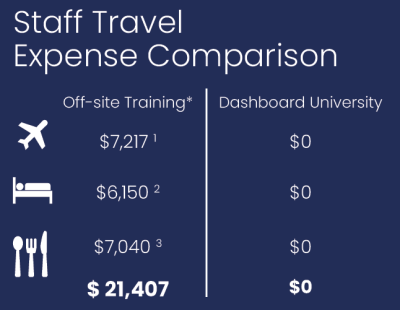
DBU training courses are conducted on-site at your
location over a 5-day period. Each course session
accommodates up to 20 attendees and delivers
up to 800 cumulative training hours at little or no
travel costs. Consider that the travel expense for
20 attending off-site training can easily exceed
$20,000. Spending less on training-related travel
means you retain more of your budget for actual
training.